The console is where an SMS administrator actually lives. It is also where most buying decisions go wrong, because a demonstration shows the dashboard and never shows the third hour of a fault. The useful question is not whether an SMS gateway with web management ships a browser interface — almost all do — but which operational tasks stop at the device and which ones force you to buy a separate platform.
That boundary determines your headcount. A console that can bulk-import SIM records, keep a searchable delivery log, and expose a read-only account for support will absorb most daily operations. A console that cannot will push the same work into a spreadsheet and a set of shared credentials, and that work does not scale with the fleet.
What does an SMS gateway with web management control out of the box?
It controls channel state, not business logic.
The built-in console manages what the device owns: which SIM is active, which port is registered, what was sent, whether it was acknowledged, and how many attempts it took. It does not own customer identity, consent records or conversation history.
It helps to split the console into three layers. The inventory layer covers the physical and logical SIM estate: which slot holds which SIM, what the SIM is named, which group it belongs to, and whether it is currently enabled. The transport layer covers ports, network registration, protocol endpoints and the outgoing queue. The evidence layer covers the message log, delivery state and export.
When you evaluate a model, ask which of those three layers is genuinely complete. A console with a rich transport view and no usable inventory view is a device you will operate from a spreadsheet. A console with logs but no export is a device you will operate from screenshots. The published SK-SMS Gateway line includes a web management interface alongside SMPP and HTTP API access, and its log exposes per-message status, carrier latency and retry counts — that evidence layer is the part worth testing first.
One consequence of this split is worth stating plainly: the console should never become the system of record for permission. Consent, opt-out state and sender identity belong to the application that owns the customer relationship, not to a device that will be replaced while that relationship continues.
Which SIM operations belong in the device console?
Five operations decide whether a console scales.
Adding SIMs one at a time does not survive a 128-slot deployment, so these five operations determine whether the console is usable at fleet scale.
Bulk import and naming. Adding SIMs one at a time does not survive contact with a 128-slot deployment. Ask whether the console accepts a file import, and whether naming survives a device restart. A convention that ties the SIM name to the slot and the carrier is worth more than any dashboard widget, because it is what makes a support call resolvable in minutes.
Grouping and policy. Groups let you apply an operational rule to a set of SIMs rather than to each one: this group carries outbound campaign traffic, that group is reserved for inbound. Groups are what make the directional separation described in two-way messaging designs enforceable rather than aspirational.
Enable and disable. The ability to take a single SIM out of service without touching the others is the difference between a controlled intervention and a maintenance window. Check that a disabled SIM is visibly distinguishable in the log, so a later investigation does not misread an intentional action as a fault.
Signal and registration state. Per-SIM visibility of registration and signal quality is what lets you diagnose a coverage problem before it becomes a delivery problem. If the console shows only aggregate device status, you will discover a dead slot from a customer complaint.
Read-only accounts. Support and audit functions should not require the credentials that can change routing. If the console offers only one permission level, plan for a separate platform layer sooner rather than later.
How much delivery-log history should you keep on the device?
Keep enough on the device to diagnose, and the rest off it.
A device-local log is an operational tool. Its useful life is measured in days to weeks, because its purpose is to answer “what happened in the last hour” during an incident. Anything longer belongs in your own storage, where it can be retained, joined to business data and protected under the same policy as the rest of your records.
Three properties decide whether the log is usable. Granularity means the log records per-message state rather than per-batch totals; a summary that says a campaign completed tells you nothing when a single recipient disputes delivery. Retention means the console states how many records or how many days it holds, and behaves predictably when that limit is reached. Export means you can extract the log in a format your own systems can ingest, without manual transcription.
Whatever the device retains, treat external collection as part of the design. A scheduled export into your own storage gives you the audit trail, and it also gives you something the device cannot: the ability to correlate a delivery state with a customer record, an order or a ticket.

How many SIM slots does each port tier manage?
The ratio decides how much inventory a console must handle.
Port counts rise slowly across the range while SIM slot counts multiply from 4 to 512. The console absorbs that administrative workload, not the radio.
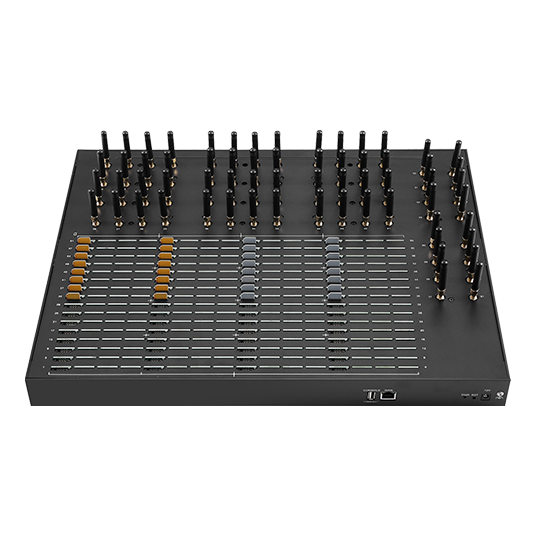
At the low end, a 4-port device with 4 slots is manageable from a screen. At the high end, a 64-port device with 512 slots is an inventory system with a radio attached, and the console’s import, naming and grouping behaviour becomes the primary buying criterion.
| Tier | Representative model | Ports | SIM slots | List price (USD) |
|---|---|---|---|---|
| Entry | SK-SMS Gateway 4-4 | 4 | 4 | $238.00 |
| Small | SK-SMS Gateway 8-32 | 8 | 32 | $450.00 |
| Mid | SK-SMS Gateway 16-64 | 16 | 64 | $800.00 |
| Mid | SK-SMS Gateway 16-256 | 16 | 256 | $1,080.00 |
| High | SK-SMS Gateway 32-512 | 32 | 512 | $1,690.00 |
| High | SK-SMS Gateway 64-512 | 64 | 512 | $2,480.00 |
Read the table from the operations side. Moving from a 16-64 model to a 16-256 model quadruples the SIM estate at the same port count; the transport workload is unchanged, and the administrative workload is not. That is the trade you are actually making, and it is the reason the console’s bulk operations deserve a test before purchase rather than after.
When does the built-in interface stop being enough?
It stops when two people need different permissions.
A single set of console credentials stops working once customers or departments share the hardware, and once delivery evidence has to join a business record.
Three signals appear reliably in growing deployments. The first is multi-tenancy: the moment different customers, departments or business units share the hardware, a single set of console credentials stops being acceptable. The second is reconciliation: when finance or compliance needs delivery evidence joined to business records, the device log becomes an input rather than an answer. The third is fleet heterogeneity: once you run more than one model, or more than one site, an operator who must log in to each device separately becomes the bottleneck.
Any of those three justifies a platform layer. None of them justifies abandoning the console — the device interface remains the fastest way to act on a single fault, and a platform that cannot push an operator back to the device view will slow incident response.
What the platform adds is aggregation, identity and retention: one authentication point, one place where a tenant can see only their own traffic, and one place where history outlives the hardware. If your roadmap includes any of those, choose models whose logs export cleanly, because that export is the migration path.
How should you expose the console for remote administration?
Reach the console over a private path.
The console is an administrative interface for infrastructure that sends messages on your behalf, so its exposure deserves the same treatment as any other management plane.
Three options are common, and they are not equally good.
Direct port mapping exposes the console to the internet on a forwarded port. It is the quickest to configure and the hardest to defend, because the console becomes reachable by anything that can scan. If you must use it, restrict source addresses and terminate TLS properly rather than relying on the device’s default certificate. Current TLS configuration guidance, including the cipher suites and protocol versions that should no longer be offered, is published by NIST in SP 800-52 Revision 2.
A management VPN places the console on a private network reachable only through an authenticated tunnel. It costs a client configuration on each administrator’s machine and removes the console from public reachability entirely. For most deployments with more than one device, this is the default choice.
A reverse tunnel or outbound-only agent lets the device initiate the connection, which removes the need for any inbound firewall rule at the site. It is the strongest option for remote or third-party locations where you do not control the network edge.
Whichever path you choose, treat credentials separately from transport. Individual accounts, no shared administrator login, and multi-factor authentication on the path in front of the console all belong in the design; NIST SP 800-63B sets out the current thinking on authenticator strength, throttling and password handling that a management plane should meet. Where the console itself cannot enforce those controls, the tunnel in front of it must.
What does a management-interface acceptance test cover?
Six checks separate a demonstration from an incident.
Run all six on the exact model and firmware version you intend to buy, before the purchase order is raised, and keep the results as the baseline for later incidents.
- Bulk import. Import the full SIM estate from a file, confirm every record appears with the intended name, and confirm the names survive a power cycle.
- Group enforcement. Create a group, apply an operational rule to it, and verify the rule holds after another group is edited.
- Log search and export. Find one specific message by originating address, export the surrounding window, and open the export in your own tooling without manual cleanup.
- Permission model. Create a read-only account and confirm it cannot change routing, disable a SIM, or reach configuration pages.
- Retention boundary. Fill the log to its stated limit and confirm the oldest records roll off without breaking search or export.
- Remote access path. Reach the console through the production path you intend to use, with TLS verified and with the console unreachable from your ordinary internet connection.
Check three and check five are the ones that distinguish a fleet-ready console from a bench-ready one. A console whose export requires a particular browser, or whose search degrades once the log is full, will be judged unusable by the people who have to use it at two in the morning.
Two further layers of assurance are worth requesting in writing rather than assuming. First, ask how firmware updates are delivered and signed, and whether an update can be staged and rolled back; a management plane whose firmware path is undocumented is a risk you cannot delegate. Second, confirm that the vendor’s own security documentation and any independent assessment apply to the exact model and firmware version you are buying — the ETSI standards catalogue and the ITU-T study group publications are useful reference points when you need to state security expectations in procurement language, and M3AAWG publishes operational practice guidance for messaging infrastructure that maps well onto console hardening.
Conclusion
A built-in web management interface is worth exactly as much as the operational tasks it removes. The three layers that matter are SIM inventory, transport state and delivery evidence, and the console should be tested against each of them rather than against a dashboard tour. In practice, three properties separate a fleet-ready console from a bench-ready one: bulk SIM import with durable naming, a per-message log that can be searched and exported, and at least one restricted permission level.
The point at which the console stops being sufficient is predictable — the first time two people need different permissions, or the first time delivery evidence has to be joined to a business record. Choosing models whose logs export cleanly makes that transition a data migration rather than a rebuild, and it keeps the device interface as the fastest path for single-fault response. For deployments that also carry commercial traffic, the consent and sender-identification obligations sit with your platform and your compliance owner, and the current expectations for the North American market are set out by organisations such as the CTIA.
Test the console before you commit to a tier. Send the SIM estate size you need to manage and the number of administrators who require access to service@telarvo.com, or review the published port and SIM configurations across the SK-SMS Gateway range.
FAQ
Can the built-in console replace a third-party SMS management platform?
For a single device, one or two administrators and a modest SIM estate, usually yes. The console replaces a platform until the point where you need per-user permissions, tenant separation or log retention that outlives the hardware. At that point the device console remains your fastest fault-response tool, and the platform takes over aggregation, identity and long-term retention.
How many SIM records should a console be able to import at once?
Enough that the import matches the largest model you might buy rather than the model you are buying today. A console tested with 32 records tells you little about behaviour with 512. Ask the vendor to demonstrate a full-estate import on the specific model and firmware version under consideration, and confirm the import is idempotent so a repeated upload does not duplicate records.
Is it safe to expose the device console directly to the internet?
It is the least defensible of the available options. Port mapping puts an administrative interface within reach of internet-wide scanning. A management VPN or an outbound-only tunnel removes that exposure at the cost of a client configuration, and current TLS configuration guidance recommends retiring older protocol versions and weak cipher suites, which many device consoles still offer by default.
Does the management interface affect message throughput?
The interface itself does not, but log retention and polling can. A console that writes detailed records for every message and retains them indefinitely will eventually consume storage and slow log operations. Set a retention limit that matches your diagnostic window, export the full history to your own systems, and confirm performance with the log at its configured limit rather than with an empty one.